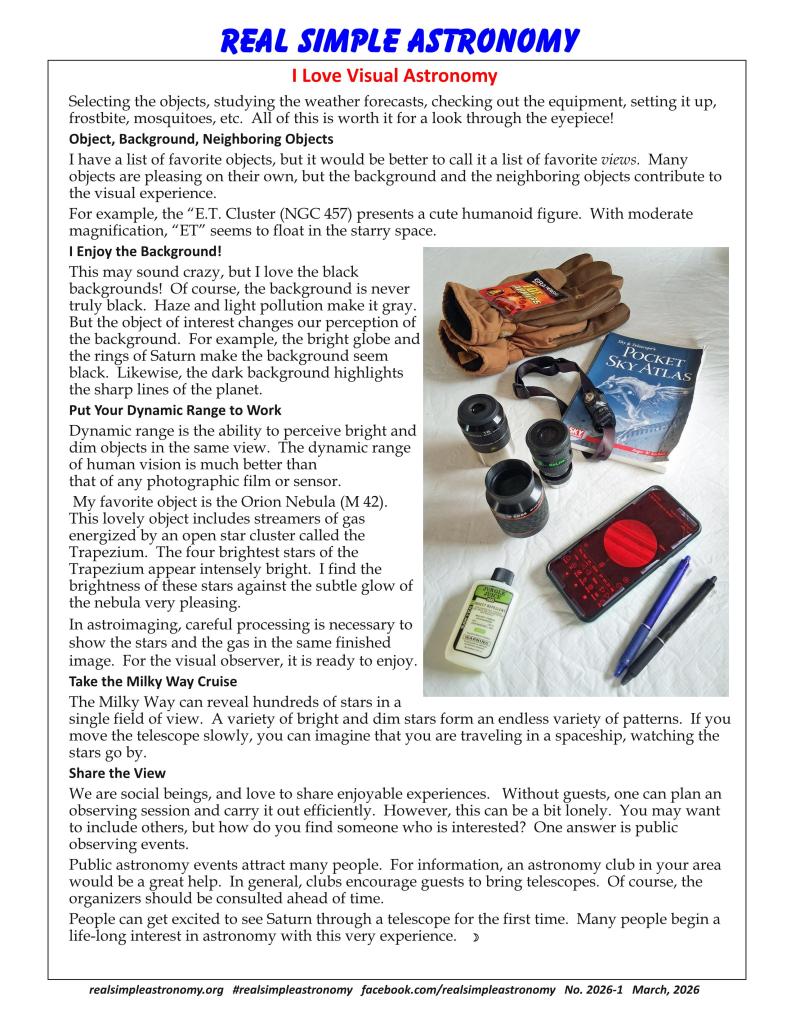
Selecting the objects, studying the weather forecasts, checking out the equipment, setting it up, frostbite, mosquitoes, etc. All of this is worth it for a look through the eyepiece!
Object, Background, Neighboring Objects I have a list of favorite objects, but it would be better to call it a list of favorite views. Many objects are pleasing on their own, but the background and the neighboring objects contribute to the visual experience. For example, the “E.T. Cluster (NGC 457) presents a cute humanoid figure. With moderate magnification, “ET” seems to float in the starry space.
I Enjoy the Background! This may sound crazy, but I love the black backgrounds! Of course, the background is never truly black. Haze and light pollution make it gray. But the object of interest changes our perception of the background. For example, the bright globe and the rings of Saturn make the background seem black. Likewise, the dark background highlights the sharp lines of the planet.
Put Your Dynamic Range to Work Dynamic range is the ability to perceive bright and dim objects in the same view. The dynamic range of human vision is much better than that of any photographic film or sensor. My favorite object is the Orion Nebula (M 42). This lovely object includes streamers of gas energized by an open star cluster called the Trapezium. The four brightest stars of the Trapezium appear intensely bright. I find the brightness of these stars against the subtle glow of the nebula very pleasing. In astroimaging, careful processing is necessary to show the stars and the gas in the same finished image. For the visual observer, it is ready to enjoy.
Take the Milky Way Cruise The Milky Way can reveal hundreds of stars in a single field of view. A variety of bright and dim stars form an endless variety of patterns. If you move the telescope slowly, you can imagine that you are traveling in a spaceship, watching the stars go by.
Share the View We are social beings, and love to share enjoyable experiences. Without guests, one can plan an observing session and carry it out efficiently. However, this can be a bit lonely. You may want to include others, but how do you find someone who is interested? One answer is public observing events. Public astronomy events attract many people. For information, an astronomy club in your area would be a great help. In general, clubs encourage guests to bring telescopes. Of course, the organizers should be consulted ahead of time. People can get excited to see Saturn through a telescope for the first time. Many people begin a life-long interest in astronomy with this very experience.
A record-keeping system helps to preserve the memory of the ups and downs of stargazing. By looking at the records, we can evaluate different observing sites, equipment, and techniques. Besides, it is enjoyable to re-live some of the experiences, like a time of ultra-good seeing or a night where Jupiter and Saturn were in the same field of view…or the session that ended early for lack of a jacket.
I thought it would be helpful to describe my system so that you can pick up any useful ideas.
Using Microsoft Excel Spreadsheets
My logging system has been evolving as long as I have been observing. I gravitated to Microsoft Excel because I was already familiar with it.
I like Excel because it has a comfortable user interface and gives you the freedom to organize your data any way you like. It allows you to find records and sort them easily.
Starting to use Excel is a bit like moving to a new country. The roads and signs are unfamiliar. You would probably start by learning how to get to work. Once you master that, you could learn other routes. You would learn your way a step at a time.
So, try not to be distracted by the many Excel functions. There will be a few that you will use a lot, and many that you will never use.
The spreadsheet format is very flexible. If you want to create a new category, like “Objects for Kids”, it takes a few seconds to add a column and give it a name. For planning a new observing night, the columns can be moved, so that the useful information is easily visible.
The sort features will help you find specific records.
If you don’t have Microsoft Excel, Apache OpenOffice or Google Sheets can open this file. Unfortunately, many rogue entities offer “free” apps, which function poorly.
The Worksheets
An Excel file is called a workbook. It consists of one or more worksheets identified by tabs. The worksheets are independent of each other (at the beginner level). The following worksheets are in the sample workbook:
Logbook: Contains all of the records. It has three types of records:
Observations: Circumstances and notes for each observation.
Descriptions: Background information for some observed or unobserved objects.
Sessions: Record of Date, Location, and summary of each session.
Constellations: for reference.
Data Explanations: May be helpful for understanding my terminology.
How To: Explanation of some Excel operations.
Using Excel
I would love to do a tutorial, but other people have done a much better job. Why duplicate the effort?
Another approach to learning Excel is to simply start using it and using online resources to answer your questions.
I have listed a few Excel operations in the How-To worksheet.
Easy Sorting
This Excel feature is very useful, and not widely known:
Here is an exercise in sorting:
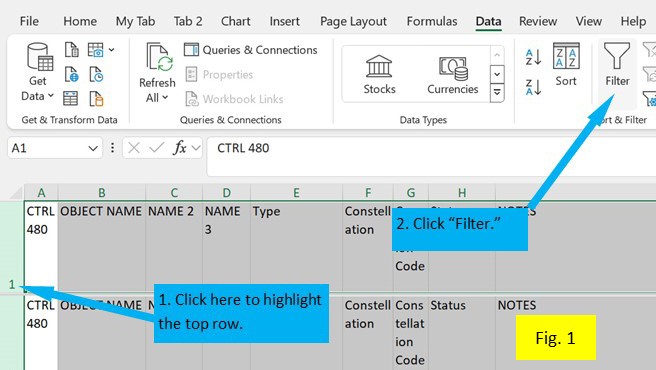
See figure 1. Highlight the first row of the worksheet. Click on “Data” on the top toolbar. Go to the section called “Sort & Filter.” Click on the icon called “Filter.” Note that each cell in the first row now includes a small arrowhead. When you click on the arrowhead, several sorting options appear. The first two options allow the sheet to be listed in alphabetical or reverse-alphabetical order. The bottom section contains a label for each entry in the column with a checkbox. If the box is checked, all rows with that name are displayed.
Here is an exercise, using the Logbook worksheet:
Let’s say you want to list all of your favorite open clusters, grouped by constellation.
1. Click on the arrowhead in the “Type” column.
2. Click the “Select All” box. Note that all of the boxes are now de-selected.
3. Scroll down to the “Open Cluster” label and click on its box, followed by “OK.”
4. The “Type” column will display all of the Open Cluster entries. Note that the arrowhead symbol has been replaced with a funnel-shaped symbol. This is a reminder that only the selected entries are displayed.
5. In the “Status” Column, follow a similar process to show only the lines with the label “Favorites”.
6. In the “Constellation” column, click the arrowhead box and click “Sort A-Z”.
During the Observing Session
On paper, I jot down the items that pertain to the session. These include weather, sky transparency, seeing, start time, end time. If I end the session early, I will include the reason. I also make notes of problems and things to fix later on. For a public event, I try to simply list the objects viewed, rather than make detailed log entries. This information will be transcribed onto the Logbook worksheet.
I use the logging feature of SkySafari to make temporary notes. I select the object, followed by “Create New Observation”. SkySafari stamps the entry with the current date and time (To ensure a correct time stamp, press the “Now” button on the main screen).
I indicate which eyepiece was used, and a three-digit rating for the observation:
First digit: Sky condition, a combination of light pollution, darkness, transparency and seeing. “5” indicates excellent sky condition; “1” indicates near-impossible viewing.
Second digit: Visibility of the object. “5” indicates no trouble in locating the object. “1” indicates the limit of visibility. “0” indicates inability to see the object, despite accurate aim of the telescope. If I am not sure of the scope aim, I write “couldn’t find”.
Third digit: Subjective assessment of the visual appeal of the object. “5” indicates a very pleasing object. Lower numbers indicate less enjoyable objects.
Next, I enter my comments.
Later, I transcribe my SkySafari notes to the Logbook worksheet.
Entering the Observations
I begin by sorting the data in the Logbook worksheet by object name.
I search for earlier observations by entering the Object Name into the Search function (Control F). I then review them.
I insert a blank row and enter the new observation data.
I review what I have learned by this observation:
Do I want to observe this object again?
Can I improve my technique?
Do I want to change the Status to “Favorites” or “Showpieces”?
After I enter all of the observations, I sort the data by Date, newest to oldest. I check for omissions by comparing the worksheet entries with the SkySafari list (click on “Observe”, “Observations” in SkySafari).
Protecting the Data
Keep Some of the Old Workbooks
I have made blunders which have caused loss of information. On one occasion, I deleted data which should have been kept. Another time, several observation notes were matched with the wrong object names.
To repair mistakes, it can be helpful to have the older records. After a major revision, I like to use the “Save As” icon to save the worksheet under a new name. (If I close by hitting the “Save” icon, the earlier version is overwritten).
The Last Row Number
This column helps me to account for each line in the Logbook worksheet. The words “Last Row Number” are followed by a number. This is the row number for the last entry. This number should be the previous number, adjusted for entries added or deleted. For example, if the number is 420, and I add 12 new observations, the new number will be 432.
Your Logging System
My logging system doesn’t need to be your logging system. Everyone has different interests and needs. So, you can modify the sample workbook or start with a blank workbook.
Please let me know if things are unclear. I will try to explain things better.
I hope that this article will help you to remember your times under the stars!
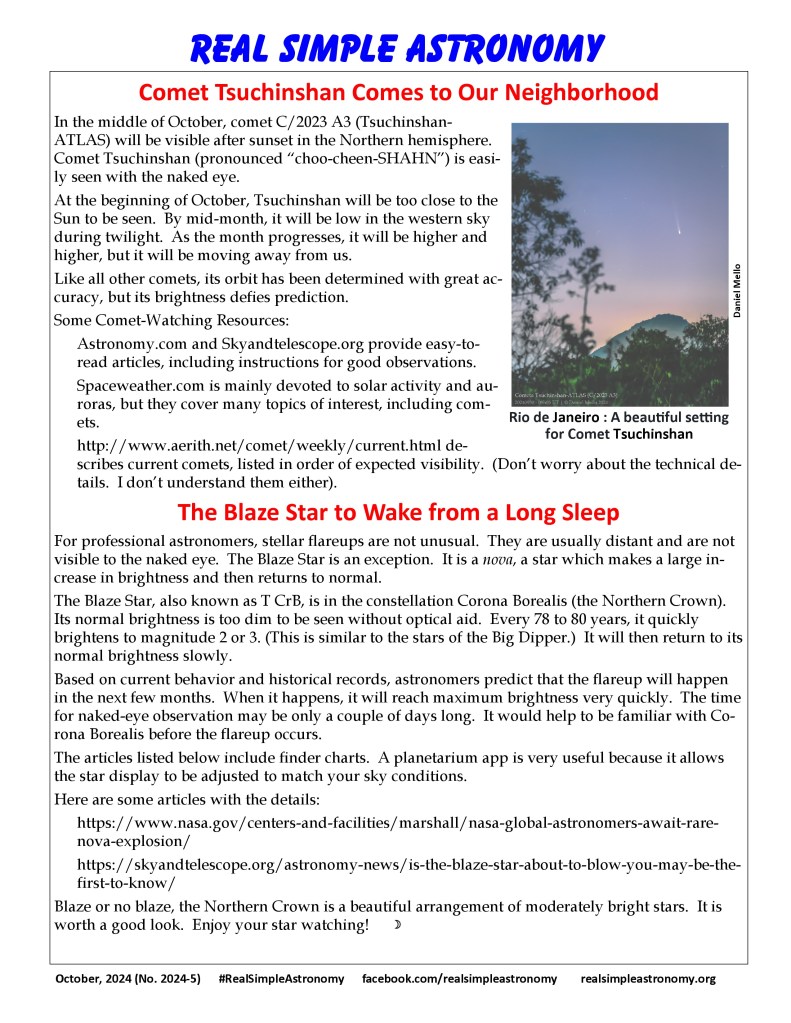
In the middle of October, comet C/2023 A3 (Tsuchinshan-ATLAS) will be visible after sunset in the Northern hemisphere. Comet Tsuchinshan (pronounced “choo-cheen-SHAHN”) is easily seen with the naked eye.
At the beginning of October, Tsuchinshan will be too close to the Sun to be seen. By mid-month, it will be low in the western sky during twilight. As the month progresses, it will be higher and higher, but it will be moving away from us.
Like all other comets, its orbit has been determined with great accuracy, but its brightness defies prediction.
Some Comet-Watching Resources:
Astronomy.com and Skyandtelescope.org provide easy-to-read articles, including instructions for good observations.
Spaceweather.com is mainly devoted to solar activity and auroras, but they cover many topics of interest, including comets.
http://www.aerith.net/comet/weekly/current.html describes current comets, listed in order of expected visibility. (Don’t worry about the technical details. I don’t understand them either).
The Blaze Star to Wake from a Long Sleep
For professional astronomers, stellar flareups are not unusual. They are usually distant and are not visible to the naked eye. The Blaze Star is an exception. It is a nova, a star which makes a large increase in brightness and then returns to normal.
The Blaze Star, also known as T CrB, is in the constellation Corona Borealis (the Northern Crown). Its normal brightness is too dim to be seen without optical aid. Every 78 to 80 years, it quickly brightens to magnitude 2 or 3. (This is similar to the stars of the Big Dipper.) It will then return to its normal brightness slowly.
Based on current behavior and historical records, astronomers predict that the flareup will happen in the next few months. When it happens, it will reach maximum brightness very quickly. The time for naked-eye observation may be only a couple of days long. It would help to be familiar with Corona Borealis before the flareup occurs.
The articles listed below include finder charts. A planetarium app is very useful because it allows the star display to be adjusted to match your sky conditions.
I just heard that comet C/2020 R4 (Atlas) can be seen with binoculars, and is directly overhead for viewers in the Northern Hemisphere. Happy Observing!
A pair of eclipses is coming soon: a total eclipse of the Moon on May 26, 2021 and an annular solar eclipse on June 10, 2021. There are many resources available on line, but I just found one which makes it easy to get the details for your locality.
A satellite capable of capturing and de-orbiting a derelict object has been launched and will soon begin testing. If successful, it will help prevent collisions which flood the orbital paths with deadly debris.
In my opinion, the owner of the defunct satellite should pay for the expense of a retrieval mission. If this can be enforced, spacefarers would find it economical to include reliable de-orbiting systems into their spacecraft.
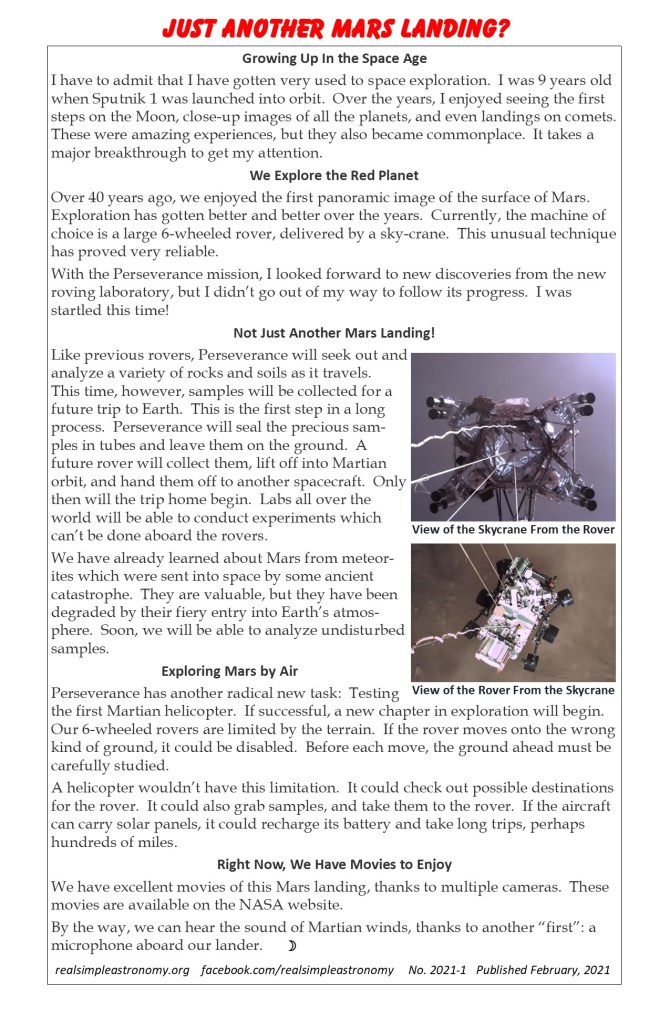
Growing Up In the Space Age I have to admit that I have gotten very used to space exploration. I was 9 years old when Sputnik 1 was launched into orbit. Over the years, I enjoyed seeing the first steps on the Moon, close-up images of all the planets, and even landings on comets. These were amazing experiences, but they also became commonplace. It takes a major breakthrough to get my attention. We Explore the Red Planet Over 40 years ago, we enjoyed the first panoramic image of the surface of Mars. Exploration has gotten better and better over the years. Currently, the machine of choice is a large 6-wheeled rover, delivered by a sky-crane. This unusual technique has proved very reliable. With the Perseverance mission, I looked forward to new discoveries from the new roving laboratory, but I didn’t go out of my way to follow its progress. I was startled this time! Not Just Another Mars Landing! Like previous rovers, Perseverance will seek out and analyze a variety of rocks and soils as it travels. This time, however, samples will be collected for a future trip to Earth. This is the first step in a long process. Perseverance will seal the precious samples in tubes and leave them on the ground. A future rover will collect them, lift off into Martian orbit, and hand them off to another spacecraft. Only then will the trip home begin. Labs all over the world will be able to conduct experiments which can’t be done aboard the rovers. We have already learned about Mars from meteorites which were sent into space by some ancient catastrophe. They are valuable, but they have been degraded by their fiery entry into Earth’s atmosphere. Soon, we will be able to analyze undisturbed samples. Exploring Mars by Air Perseverance has another radical new task: Testing the first Martian helicopter. If successful, a new chapter in exploration will begin. Our 6-wheeled rovers are limited by the terrain. If the rover moves onto the wrong kind of ground, it could be disabled. Before each move, the ground ahead must be carefully studied. A helicopter wouldn’t have this limitation. It could check out possible destinations for the rover. It could also grab samples, and take them to the rover. If the aircraft can carry solar panels, it could recharge its battery and take long trips, perhaps hundreds of miles. Right Now, We Have Movies to Enjoy We have excellent movies of this Mars landing, thanks to multiple cameras. These movies are available on the NASA website. By the way, we can hear the sound of Martian winds, thanks to another “first”: a microphone aboard our lander.
I forgot to mention the Geminid meteor shower, which peaks at 2 AM on the night of December 13/14, 2020. It is predicted to be better than the August Perseids.
I have included some links, but here is the bottom line: 1. Set up a recliner, 2. Set your alarm for 2 AM, 3. Put on everything warm that you have, 4. Watch the sky for at least a half hour. This is my plan.
During the current year, Jupiter and Saturn have been moving closer together in the sky. Now, they are close enough to be covered by one’s thumb held at arm’s length. For the next few weeks, they will continue to close in. Their closest position will occur on December 21. On this evening they can be covered by a toothpick!
Of course, this is just an appearance (called a conjunction). The two giant planets are always millions of miles apart. Conjunctions occur when two or more objects appear close together. Conjunctions are not unusual, but ones this close ones are very rare.
This is a good time to talk about orbital inclinations. Imagine you had a flat piece of paper bigger than the solar system. You could arrange it so that the orbit of Jupiter stays on the paper. To do the same thing for Saturn, you would have to move the paper, but you would lose the orbit of Jupiter. If you add a second piece of paper, you could use one for Jupiter’s orbit and one for Saturn’s orbit.
These sheets of paper are called orbital planes. Because two sheets are needed, we say that the orbital planes of Jupiter and Saturn are inclined at different angles. Before we go, let’s mark the orbits on their sheets.
In the diagram above, the positions of the two planets are shown for four nights. The orbital paths are from the two sheets of paper, as viewed from Earth. Notice that the planets have similar, but not identical paths. This year, Jupiter and Saturn will be close together in two ways. First, on December 21, they come close in their orbital journey around the Sun. Secondly, on this date, their orbital paths are close to each other.
Many centuries can pass between these events. Usually, the planets meet when their orbital paths are further apart. They will be seen in the same area of the sky, but they will be further apart.
Tonight would be a good time to start watching the dance of the giants. No equipment is needed.
If a telescope is available, a unique view will be possible: for a few days before and after December 21, both planets can be seen in the same view.
This link has an animated graphic which may help in visualizing orbital inclinations:






 Real Simple Astronomy